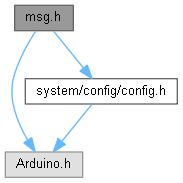
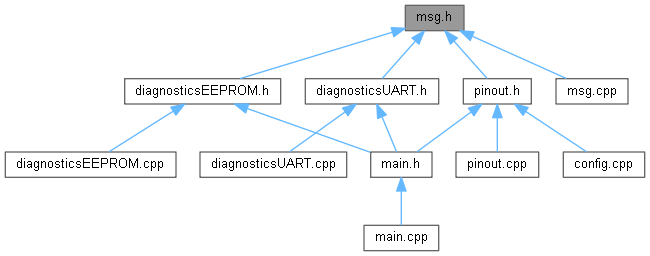
Ir al código fuente de este archivo.
Funciones | |
| void | standardMessage (const char *message, const char *file, const char *function, const char *date, const char *time) |
| Prints an enriched log message to the serial monitor. | |
| void | standardHeader (const char *message, uint16_t width=200, char deco='-') |
| Imprime un encabezado decorativo con el mensaje centrado. | |
| void | standardHeaderFull (const char *message, const char *file, const char *function, const char *date, const char *time, uint16_t width=120, char deco='-') |
| Prints a decorated header with centered text and padding on both sides. | |
| void | standardErrorMessage (const char *message, const char *file, const char *function, const char *date, const char *time, int line) |
| Prints an enriched error message to the serial monitor, including contextual information. | |
| void | showConfigurationMessage (const configuracionMain &configuration) |
| Displays the current system configuration status on the serial monitor. | |
| void | printVersion (const char *fwVersion, const char *fwName, const char *fwDate, const char *fwAuthor, const char *appVersion, const char *appName, const char *appDate) |
| Prints firmware version details to the serial monitor. | |
Documentación de funciones
◆ printVersion()
| void printVersion | ( | const char * | fwVersion, |
| const char * | fwName, | ||
| const char * | fwDate, | ||
| const char * | fwAuthor, | ||
| const char * | appVersion, | ||
| const char * | appName, | ||
| const char * | appDate ) |
Prints firmware version details to the serial monitor.
Displays firmware and application information (version, name, date, author) defined by macros in a clear format for easy verification.
Prints firmware version details to the serial monitor.
Muestra:
- versión del firmware
- nombre
- fecha
- autor
- versión de la aplicación
- nombre de la aplicación
- fecha de la aplicación
Definición en la línea 248 del archivo msg.cpp.


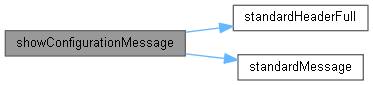
◆ showConfigurationMessage()
| void showConfigurationMessage | ( | const configuracionMain & | configuration | ) |
Displays the current system configuration status on the serial monitor.
This function prints the current values of the fields defined in the configuracionMain structure, such as debug mode and LED project status, in a user-friendly format to facilitate system diagnostics or verification.
- Parámetros
-
configuration Structure containing the main system configuration.
Displays the current system configuration status on the serial monitor.
Presenta los valores de la estructura configuracionMain con un formato visual claro y amigable.
- Parámetros
-
configuration Estructura de configuración del sistema.
Definición en la línea 203 del archivo msg.cpp.
◆ standardErrorMessage()
| void standardErrorMessage | ( | const char * | message, |
| const char * | file, | ||
| const char * | function, | ||
| const char * | date, | ||
| const char * | time, | ||
| int | line ) |
Prints an enriched error message to the serial monitor, including contextual information.
This function generates a structured output that helps identify the origin of runtime errors. The output includes:
- Compilation date and time
- Source file name
- Function name from which it is invoked
- Line number where the function was called
- Custom error message
Output format: [date time] file::function (Line N) ❌ ERROR ➤ message
Example output: [Aug 7 2025 01:23:00] sensor.cpp::readSensor (Line 42) ❌ ERROR ➤ Failed to initialize sensor
- Parámetros
-
message Description of the specific error file Source file name (FILE) function Function name where the error was detected (FUNCTION) date Compilation date (DATE) time Compilation time (TIME) line Line number in the file where the function is invoked (LINE)
Prints an enriched error message to the serial monitor, including contextual information.
Incluye:
- fecha y hora
- archivo
- función
- número de línea
- mensaje de error
- Parámetros
-
message Mensaje de error. file Archivo origen. function Función origen. date Fecha de compilación. time Hora de compilación. line Número de línea donde se invoca.
Definición en la línea 177 del archivo msg.cpp.
◆ standardHeader()
| void standardHeader | ( | const char * | message, |
| uint16_t | width, | ||
| char | deco ) |
Imprime un encabezado decorativo con el mensaje centrado.
Prints a centered header with decorative lines above/below. This is a reduced version without metadata, ideal for section titles.
- Parámetros
-
message The title text to display centered. width Total width of the decorative line (default: 200). deco Decorative character to use (default: '-').
Genera una línea con caracteres decorativos a ambos lados del texto, manteniendo un ancho total definido por el usuario.
- Parámetros
-
message Texto a centrar. width Ancho total de la línea. deco Carácter decorativo.
Definición en la línea 72 del archivo msg.cpp.
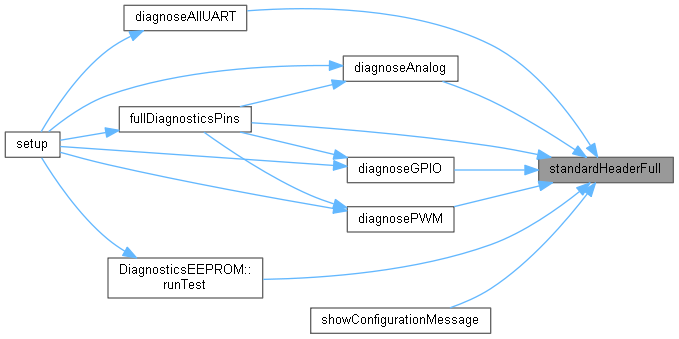
◆ standardHeaderFull()
| void standardHeaderFull | ( | const char * | message, |
| const char * | file, | ||
| const char * | function, | ||
| const char * | date, | ||
| const char * | time, | ||
| uint16_t | width, | ||
| char | deco ) |
Prints a decorated header with centered text and padding on both sides.
This function builds a single line consisting of a combined text that includes the message, file, function, date, and time, surrounded by decorative characters on the left and right to achieve a total line width specified by the user.
Output format example: --— Message | file | function | date time --—
- Parámetros
-
message Main text or description to display. file File path or source file name. function Name of the function where this is called. date Compilation date (recommended: DATE). time Compilation time (recommended: TIME). width Total width of the line (default: 120). deco Decorative character (default: '-').
- Nota
- The number of decorative characters is automatically adjusted to keep the text centered within the given width.
Prints a decorated header with centered text and padding on both sides.
Construye una línea única que incluye:
- mensaje principal
- archivo
- función
- fecha y hora
Todo ello centrado y rodeado de caracteres decorativos.
- Parámetros
-
message Mensaje principal. file Archivo origen. function Función origen. date Fecha de compilación. time Hora de compilación. width Ancho total de la línea. deco Carácter decorativo.
Definición en la línea 121 del archivo msg.cpp.
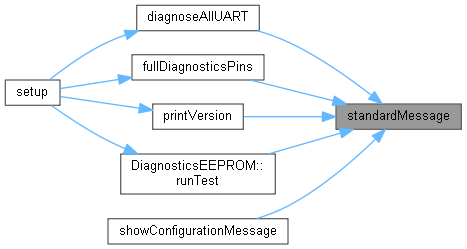
◆ standardMessage()
| void standardMessage | ( | const char * | message, |
| const char * | file, | ||
| const char * | function, | ||
| const char * | date, | ||
| const char * | time ) |
Prints an enriched log message to the serial monitor.
This function should be defined in the corresponding source (.cpp) file. It generates a structured output that includes:
- Compilation date and time
- Source file from which it is called
- Name of the calling function
- Custom message
Output format: [date time] file::function ➤ message
Example: [Aug 7 2025 01:23:00] main.cpp::setup ➤ System initialization...
- Parámetros
-
message Custom text to be printed file Source file name (FILE) function Name of the calling function (FUNCTION) date Compilation date (DATE) time Compilation time (TIME)
Prints an enriched log message to the serial monitor.
El mensaje aparece centrado entre dos líneas decorativas y acompañado de información contextual como archivo, función, fecha y hora.
- Parámetros
-
message Mensaje principal a mostrar. file Nombre del archivo origen. function Nombre de la función desde donde se llama. date Fecha de compilación o personalizada. time Hora de compilación o personalizada.
Definición en la línea 15 del archivo msg.cpp.